Stabilizer IL/NAI - illus01 v1.185c
Highlighted images


Recommended Prompts
masterpiece
Recommended Parameters
samplers
steps
cfg
resolution
other models
Recommended Hires (High-Resolution) Parameters
upscaler
upscale
denoising strength
Tips
Apply the Stabilizer LoRA to vanilla base models like NoobAI or RouWei with strength between 0.5 and 0.8 for optimal results.
Use 1 to 3 style tags or LoRAs along with Stabilizer to maintain creativity without default style or overfitting effects.
Avoid base models with strong default AI style, as they can suppress the effect of Stabilizer causing style shifting.
Leave detailed feedback in the comment section rather than the Civitai review system for better visibility.
Use the “c” version for colorful, visually striking images and the non-"c" version for natural textures and accurate style reproduction.
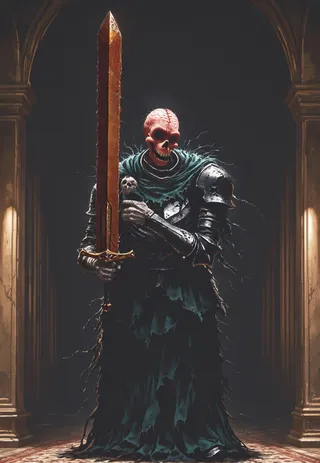
Cover images are directly from the vanilla (the original) base model in a1111, at default 1MP resolution. No upscale, no plugins. If you think they are upscaled images because they seem so clear, then this LoRA did its job well.
Sharing merges using this LoRA, re-printing it to other platforms, are prohibited. This model only published on Civitiai and TensorArt. If you see "me" and this sentence in other platforms, all those are fake and the platform you are using is a pirate platform.
Stabilizer
It's an all-in-one no-default-style finetuned base model LoRA.
If you apply it to the vanilla NoobAI e-pred v1.1, then you will get the finetuned base model.
All-in-one: It has all the commonly needed enhancements. Natural lighting and details, stable prompt understanding, better background, better hands...
Same as original finetuned base model. There is no default style. The dataset is very diverse. The base model will still remains its maximum creativity. You will not get same things (faces, backgrounds, etc.) over and over again. (Comparing to merged base models which merged tons of overfitted style LoRAs)
Most built-in styles in original base models are very overfitted. This LoRA can fix this issue. Because the dataset is very diverse. Now you can use thousands of built-in Danbooru style tags, as well as general styles that original SDXL understands, and get a clean and detailed image as it should be. No overfitting effects. No deformed images. No style pollution from merged models. No matter if it's 2D or 3D, abstract or realistic. Example:
See comparisons: 1 (artist styles), 2 (general styles)
The training dataset only contains high resolution images (avg pixels > 3MP, ~1800x1800). Zero AI image. So you can get real texture and details beyond pixel level, instead of fake edges and smooth surfaces with no texture.
However, since it is a LoRA, means you can apply it to any base model you want with adjustable strength in a second.
Why all-in-one? Because if you train 10 LoRAs with 10 different datasets for different aspects, and stack them up, your base model will blow up. If you train those datasets in one go, there will be no conflicts.
Why not finetune the full base model? I not a gigachad and I don't have millions of training images, so finetuning the entire base model is not necessary.
Why you recommend NoobAI but dropped NoobAI version of this LoRA? 1. As dataset getting bigger and bigger, it gets more expansive and time consuming to train. 2. I didn't notice downgrade for using illus version on NoobAI.
Share merges using this LoRA is prohibited. FYI, there are hidden trigger words to print invisible watermark. It works well even if the merge strength is 0.05. I coded the watermark and detector myself. I don't want to use it, but I can.
Remember to leave feedback in comment section. So everyone can see it. Don't write feedback in Civitai review system, it was so poorly designed, literally nobody can find and see the review.
Have fun.
Disambiguation:
"Stabilizer" means: When you apply it to the vanilla base model. It will have less overfitting effects, more details. See cover images.
It can NOT magically fix your base model from a broken status when you already stacked tons of LoRAs on it.
How to use
Version prefix:
illus01 = Trained on Illustrious v0.1. (Recommended, even for NoobAI)
nbep11 = Trained on NoobAI e-pred v1.1. (Discontinued)
"c" version (after illus v1.152):
"c" stands for "colorful", "creative", sometimes "chaotic". This version contains training images that are very visually striking, e.g.: Very colorful. High contrast. Strong post-effect. Complex lighting condition. Objects, complex pattens everywhere. You will get "visually striking", but less "natural" images. It may affect styles that have soft colors.
If you just want something looks cool. Use "c" version.
If you want natural texture, or to accurately reproduce certain styles. Use non "c" version.
Recommended:
Vanilla base models (NoobAI, RouWei, etc.) that no overfitted default style.
This LoRA with strength 0.5~0.8.
1~3 style tags or LoRAs.
Not recommended:
Base models with strong default AI style.
Beware that 90%+ base models have AI style inside. Because AI styles are very clean and consistent, so very easy to train and easy to use. Strong Al styles will suppress almost all the effect from this LoRA. Causing style shifting. See comparison. Top is vanilla NoobAI. Bottom is WAI, which has strong AI style.
How to know if model has AI style? No good method. Most AI styles feel smooth because there is no texture on surfaces. And also weird shiny reflections everywhere. So everything feels like plastic.
Old versions:
New version == new stuffs and new attempt. One big advantage of LoRA is that you can always mix different versions in a second.
You can find more info in "Update log". Beware that old versions may have very different effects.
Now ~: Forcing on natural details and textures, stable prompt understanding and more creativity.
Illus01 v1.23 / nbep11 0.138 ~: Forcing on pure anime style with vivid colors.
Illus01 v1.3 / nbep11 0.58 ~: Forcing on anime style.
Dataset
latest version or recent versions
~7k images total. Every image is hand-picked by me.
Only normal good looking things. No crazy art style that cannot be described. No AI images, no watermarks, etc.
Only high resolution images. The whole dataset avg pixels is 3.37 MP, ~1800x1800.
All images have natural captions from Google latest LLM.
All anime characters are tagged by wd tagger v3 first and then Google LLM.
Contains nature, outdoors, indoors, animals, daily objects, many things, except real human.
Contains all kinds of brightness conditions. Very dark, very bright, very dark and very bright.
Other tools
Some ideas that was going to, or used to, be part of the Stabilizer. Now they are separated LoRAs. For better flexibility. Collection link: https://civitai.com/collections/8274233.
Touching Grass: A LoRA trained on and only on the real world dataset (no anime dataset). Has stronger effect. Better background and lighting. Useful for gigachad users who like pure concepts and like to balance weights themselves.
Dark: A LoRA that can fix the high brightness bias in some base models. Trained on low brightness images in the Touching Grass dataset. Also, no human in dataset. So does not affect style.
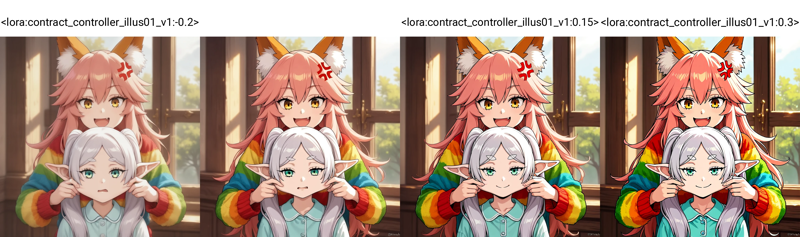
Contrast Controller: A handcrafted LoRA. (No joke, it was not from training). The smallest 300KB LoRA you have ever seen. Control the contrast like using a slider in your monitor. Unlike other trained "contrast enhancer", the effect of this LoRA is stable, mathematical linear, and has zero side effect on style.
Useful when you base model has oversaturation issue, or you want something really colorful.
Example:
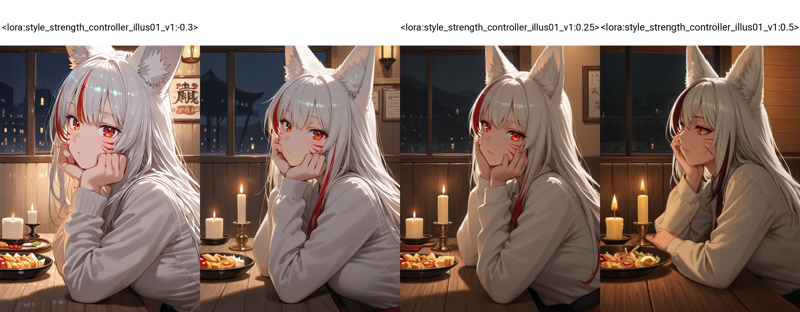
Style Strength Controller: Or overfitting effect reducer. Also a handcrafted LoRA, not from training, so zero side effect on style and mathematically linear effects. Can reduce all kinds of overfitting effects (bias on objects, brightness, etc.).
Effect test on Hassaku XL: The base model has many biases, e.g high brightness, smooth and shiny surface, printings on wall... The prompt has keyword "dark", but the model almost ignored it. Notice that: at strength 0.25, less bias of high brightness, less weird smooth feeling on every surfaces, the image feels more natural.
 Differences between Stabilizer:
Stabilizer was trained on real world data. It can only "reduce" overfitting effects about texture, details and backgrounds, by adding them back.
Style Controller was not from training. It is more like "undo" the training for base model, so it will less-overfitted. Can mathematically reduce all overfitting effects, like bias on brightness, objects.
Update log
(6/21/2025) illus01 v1.185c:
Comparing to v1.165c.
+100% clearness and sharpness. You can get lines at one pixel width. You can even get the texture of a white paper. (No joke, realistic paper is not pure white, it has noise). An 1MP image now feels like 2K.
-30% images that are too chaotic (cannot be descripted properly). So you may find that this version can't give you a crazy high contrast level anymore, but should be more stable in normal use cases.
(6/10/2025): illus01 v1.165c
This is a special version. This is not an improvement of v1.164. "c" stands for "colorful", "creative", sometimes "chaotic".
The dataset contains images that are very visually striking, but sometimes hard to describe e.g.: Very colorful. High contrast. Complex lighting condition. Objects, complex pattens everywhere.
So you will get "visually striking", but at cost of "natural". May affect styles that have soft colors, etc. E.g. This version cannot generate "pencil art" texture perfectly like v1.164.
(6/4/2025): illus01 v1.164
Better prompt understanding. Now each image has 3 natural captions, from different perspective. Danbooru tags are checked by LLM, only important tags are picked out and fused into the natural caption.
Anti-overexpose. Added a bias to prevent model output reaching #ffffff pure white level. Most of the time #ffffff == overexposed, which lost many details.
Changed some training settings. Make it more compatible with NoobAI, both e-pred and v-pred.
(5/19/2025): illus01 v1.152
Continual to improve lighting and textures and details.
5K more images, more training steps, as a result, stronger effect.
(5/9/2025): nbep11 v0.205:
A quick fix of brightness and color issues in v0.198. Now it should not change brightness and colors so dramatically like a real photograph. v0.198 isn't bad, just creative, but too creative.
(5/7/2025): nbep11 v0.198:
Added more dark images. Less deformed body, background in dark environment.
Removed color and contrast enhancement. Because it's not needed anymore. Use Contrast Controller instead.
(4/25/2025): nbep11 v0.172.
Same new things in illus01 v1.93 ~ v1.121. Summary: New photographs dataset "Touching Grass". Better natural texture, background, lighting. Weaker character effects for better compatibility.
Better color accuracy and stability. (Comparing to nbep11 v0.160)
(4/17/2025): illus01 v1.121.
Rolled back to illustrious v0.1. illustrious v1.0 and newer versions were trained with AI images deliberately (maybe 30% of its dataset). Which is not ideal for LoRA training. I didn't notice until I read its paper.
Lower character style effect. Back to v1.23 level. Characters will have less details from this LoRA, but should have better compatibility. This is a trade-off.
Other things just same as below (v1.113).
(4/10/2025): illus11 v1.113 ❌.
Update: use this version only if you know your base model is based on Illustrious v1.1. Otherwise, use illus01 v1.121.
Trained on Illustrious v1.1.
New dataset "Touching Grass" added. Better natural texture, lighting and depth of field effect. Better background structural stability. Less deformed background, like deformed rooms, buildings.
Full natural language captions from LLM.
(3/30/2025): illus01 v1.93.
v1.72 was trained too hard. So I reduced it overall strength. Should have better compatibility.
(3/22/2025): nbep11 v0.160.
Same stuffs in illus v1.72.
(3/15/2025): illus01 v1.72
Same new texture and lighting dataset as mentioned in ani40z v0.4 below. More natural lighting and natural textures.
Added a small ~100 images dataset for hand enhancement, focusing on hand(s) with different tasks, like holding a glass or cup or something.
Removed all "simple background" images from dataset. -200 images.
Switched training tool from kohya to onetrainer. Changed LoRA architecture to DoRA.
(3/4/2025) ani40z v0.4
Trained on Animagine XL 4.0 ani40zero.
Added ~1k dataset focusing on natural dynamic lighting and real world texture.
More natural lighting and natural textures.
ani04 v0.1
Init version for Animagine XL 4.0. Mainly to fix Animagine 4.0 brightness issues. Better and higher contrast.
illus01 v1.23
nbep11 v0.138
Added some furry/non-human/other images to balance the dataset.
nbep11 v0.129
bad version, effect is too weak, just ignore it
nbep11 v0.114
Implemented "Full range colors". It will automatically balance the things towards "normal and good looking". Think of this as the "one-click photo auto enhance" button in most of photo editing tools. One downside of this optimization: It prevents high bias. For example, you want 95% of the image to be black, and 5% bright, instead of 50/50%
Added a little bit realistic data. More vivid details, lighting, less flat colors.
illus01 v1.7
nbep11 v0.96
More training images.
Then finetuned again on a small "wallpaper" dataset (Real game wallpapers, the highest quality I could find. ~100 images). More improvements in details (noticeable in skin, hair) and contrast.
nbep11 v0.58
More images. Change the training parameters as close as to NoobAI base model.
illus01 v1.3
nbep11 v0.30
More images.
nbep11 v0.11: Trained on NoobAI epsilon pred v1.1.
Improved dataset tags. Improved LoRA structure and weight distribution. Should be more stable and have less impact on image composition.
illus01 v1.1
Trained on illustriousXL v0.1.
nbep10 v0.10
Trained on NoobAI epsilon pred v1.0.
Contributor

Model Details
Model type
Base model
Model version
Model hash
Creator

Discussion
Please log in to leave a comment.
Model Collection - Stabilizer IL/NAI

Stabilizer IL/NAI - illus01 v1.23

Stabilizer IL/NAI - illus01 v1.121

Stabilizer IL/NAI - illus01 v1.185c

Stabilizer IL/NAI - nbep11 v0.138

Stabilizer IL/NAI - illus01 v1.152

Stabilizer IL/NAI - illus01 v1.165c

Stabilizer IL/NAI - nbep11 v0.205

Stabilizer IL/NAI - illus01 v1.72

Stabilizer IL/NAI - illus01 v1.198






