PhotoPedia XL - 4.5
精選圖片

推薦提示詞
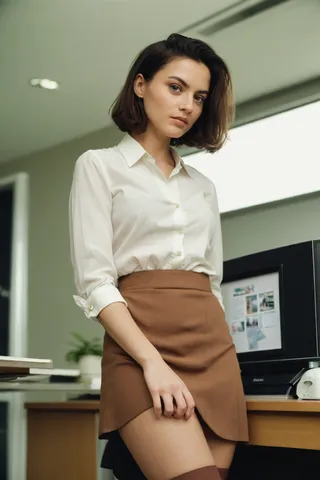
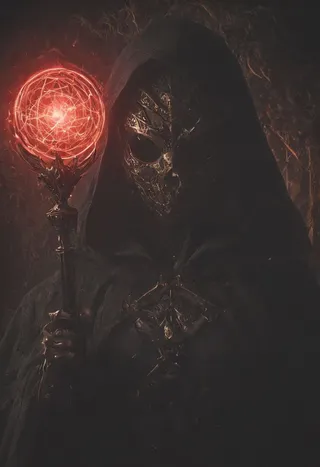
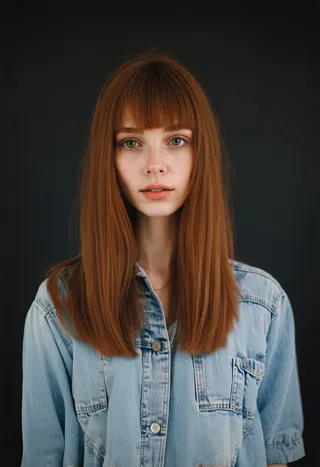
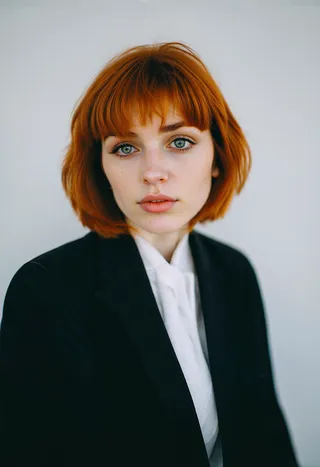
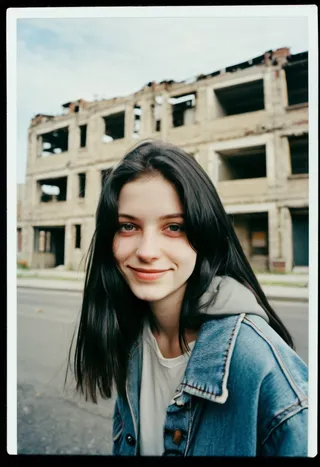
photoshoot, photo studio, RAW photo, editorial photograph, film stock photograph, cinematic, posing, amateur photo, analog, raw, f2, 35mm, an (amateur photo), flash photography, taken on an old camera, polaroid, 8k, highly detailed, (high quality, best quality:1.3), Extremely high-resolution, film grain, Kiki from Netherlands, long (waist-length:1.2) combed auburn hair, ((macro lens)), dark atmosphere, ((focused on eyes)), feminine expressions, photography, dslr, 35mm, Fujifilm Superia Premium 400, Nikon D850 film stock photograph, Kodak Portra 400 f1.6 lens, 8k, UHD
amateur photo of a --subject-- --doing something-- / --wearing something--, analogue, raw, polaroid, looking at camera, (from side:1.2), detailed skin texture, natural skin texture, perfect eyes, perfect iris, high detail eyes, detailed iris, detailed cloth texture, detailed facial features, aesthetic, depth of field, cinematic light,(high quality, best quality:1.3), Extremely high-resolution, Kodak Portra 400 camera f1.6 lens, Fujifilm Superia Premium 400, Nikon D850, <lora:add_detail:0.33>
photoshoot, photo studio, RAW photo, posing, editorial photograph, cinematic, film stock photograph, 35mm, 8k, photography, Nikon D850 film stock photograph, UHD
推薦反向提示詞
(worst quality, low quality:1.4), illustration, 3d, 2d, painting, cartoons, sketch, blur, blurry, blurred, bokeh, unclear, grainy, low resolution, downsampling, aliasing, dithering, distorted, jpeg artifacts, compression artifacts, overexposed, high-contrast, bad-contrast, poorly drawn, cropped, out of frame, [deformed, disfigured, suspenders], ((deformed iris, deformed pupils:1.4)), (physically-abnormal:2), (joint-inequalities:2), (limbs-inequalities:2), deformed, disfigured, poorly drawn hands, poorly drawn feet, poorly drawn face, out of frame, mutation, mutated, extra limbs, extra legs, extra arms, dull eyes, mismatched eyes, bad anatomy, signature, watermark, artist name, text, error
(worst quality, low quality:1.4), illustration, 3d, 2d, painting, cartoons, sketch, blur, blurry, blurred, bokeh, unclear, grainy, low resolution, downsampling, aliasing, dithering, distorted, jpeg artifacts, compression artifacts, overexposed, high-contrast, bad-contrast, poorly drawn, cropped, out of frame, deformed, disfigured, dull eyes, mismatched eyes, bad anatomy, signature, watermark, artist name, text, error
推薦參數
samplers
steps
cfg
resolution
推薦高解析度參數
upscaler
upscale
steps
denoising strength
提示
建議先無負面提示詞生成圖片,以獲得最佳效果。
從非常簡單的提示詞開始,再逐步加入複雜元素。
作者未使用負面詞嵌入與 lora,歡迎自行試驗。
修補 (Inpainting) 非常少用,僅用於修正特定問題。
使用手動 MBW 合併來提高質量。
PhotoPedia XL 📷
點擊 ❤️ 可關注 / 考慮在模型評論留下評價。歡迎提供反饋!
請閱讀以下資訊以獲得高品質圖片(點擊顯示更多)⬇
2023年1月7日 - 仍在整理資料集以微調模型,目前約收集 700 張照片,計劃加入更多。
❗ 更新 - 2023年12月11日
4.5 已發布。對成品非常滿意!
此版本進行了大量 MBW 調整。為達成此效果,來回調整超過30次合併。
可右鍵圖片,在新分頁開啟並放大查看細節。
針對手部和眼睛問題進行改進。眼睛大幅改善,手部也有提升。但生成結果仍可能出現異常。
整體感覺略有變化
編輯了模型資訊
合併配方置於頁面後半
更新4.5版生成參數和建議
即將發布建議資源連結及更多內容
會陸續發佈更多畫廊,敬請關注
📣 生成參數與建議(截至 4.5)
ℹ️ 4.5 版本生成設定如下
尺寸:1024x1024 / 1024x576 / 576x1024,我偏好用1024x1024
取樣器 - 4.5版本主要使用DPM++ 2S a Karras
步驟 - 40,可調低
CFG - 4-9,我這次用比平常低的參數,通常是4-5

生成圖片時開啟 Hires

Hires 放大倍數:1.5
Hires 步驟:15-20
Hires 降噪:約0.6
放大器:4xLSDIRplusC

把圖片送到Extras。放大1.5倍後,再次將放大圖片送到Extras,再放大1.5倍。我通常批量此操作。

第一次放大:4x Foolhardy Remacri - Extras 分頁中1.5倍放大
第二次放大:4x NKMD Superscale

未使用 ADetailer、負面詞嵌入或 Lora。
ℹ️ 主要提示詞
photoshoot, photo studio, RAW photo, editorial photograph, film stock photograph, cinematic, posing, amateur photo, analog, raw, f2, 35mm, an (amateur photo), flash photography, taken on an old camera, polaroid, 8k, highly detailed, (high quality, best quality:1.3), Extremely high-resolution, film grain, Kiki from Netherlands, long (waist-length:1.2) combed auburn hair, ((macro lens)), dark atmosphere, ((focused on eyes)), feminine expressions, photography, dslr, 35mm, Fujifilm Superia Premium 400, Nikon D850 film stock photograph, Kodak Portra 400 f1.6 lens, 8k, UHD
ℹ️ 負面提示詞
(worst quality, low quality:1.4), illustration, 3d, 2d, painting, cartoons, sketch, blur, blurry, blurred, bokeh, unclear, grainy, low resolution, downsampling, aliasing, dithering, distorted, jpeg artifacts, compression artifacts, overexposed, high-contrast, bad-contrast, poorly drawn, cropped, out of frame, [deformed, disfigured, suspenders], ((deformed iris, deformed pupils:1.4)), (physically-abnormal:2), (joint-inequalities:2), (limbs-inequalities:2), deformed, disfigured, poorly drawn hands, poorly drawn feet, poorly drawn face, out of frame, mutation, mutated, extra limbs, extra legs, extra arms, dull eyes, mismatched eyes, bad anatomy, signature, watermark, artist name, text, error建議先嘗試不使用任何負面提示生成圖片,以取得最佳效果。我個人太懶,沒一一測試它們的效果,現用的主提示詞已相當理想 x)
建議先使用非常簡單的提示詞生成,再逐漸增加複雜度
ℹ️ 我沒有使用任何負面詞嵌入或 lora 來改變輸出。如想使用,歡迎自行嘗試,我相信部分負面詞嵌入對此模型效果良好,但我一般不會過度使用。
ℹ️ 修補 (Inpainting)
幾乎不使用。大部分生成結果我都滿意(排除偶爾出現的瑕疵),除非特別喜歡某張圖想修正缺陷。
ℹ️ 本地生成
我沒有花太多時間測試,也無特別建議。目前使用本機執行 Stable Diffusion。
我的 A1111
• 版本:v1.6.0 • python:3.10.6 • torch:2.0.1+cu118 • xformers:0.0.20 • gradio:3.41.2
我的硬件設備
• 13代 Intel(R) Core(TM) i7-13700KF / 24核心 / 5.4 GHz
• NVIDIA GeForce RTX 4070 / 12 GB
• RAM 32 GB / 5200 MHz
後續計劃
持續更新
ℹ️ 授權與使用規範
此模型為開放使用,採用 CreativeML OpenRAIL-M 授權,具體說明權利及使用規範。
1. 不得使用此模型故意產生或分享非法或有害的輸出內容。
2. 作者不主張對生成內容擁有權利,您可自由使用且需為使用行為負責,該使用不得違反授權規範。
3. 可再分發模型權重,但須包含與授權一致的使用限制,並向所有使用者提供修改後的 CreativeML OpenRAIL-M 授權條款(請完整且仔細閱讀授權)。
您同意不以下列方式使用模型或其衍生物:
違反任何國家、州、省、市或國際法律法規
意圖剝削、傷害或試圖剝削、傷害未成年人的方式
生成或散播可驗證的虛假資訊或內容以傷害他人
生成或散播可用於傷害個人的個人識別資訊
誹謗、中傷或其他騷擾他人
用於完全自動化決策,對個人法律權益造成不利影響或創造、修改具約束力的義務
任何導致基於線上或線下社會行為,或已知或預測個人特質,對個人或群體歧視或傷害的使用
利用特定群體基於年齡、社會、身體或心理特徵的脆弱性,嚴重扭曲該群體成員行為,造成或可能造成身體或心理傷害
任何基於法律保護特徵或類別對個人或群體進行歧視或傷害的使用
提供醫療建議及醫療結果解讀
生成或散播用於司法、執法、移民或庇護程序等行政用途信息,例如預測個人將進行詐欺/犯罪(例如文本分析、歸因文件間關係、無差別或任意目標使用)
您需自行負責因不道德使用此模型所導致的法律責任。
以下為舊資訊
💭 雖然合併的最終目標是達到一定層次的寫實,但建議嘗試所有版本,它們各有細微差異,某些版本可能更符合您的審美。我個人尚未決定最愛,因為每個版本都有獨特之處。
📣 生成參數與建議(用於 v4 及更早版本)
ℹ️ 大部分生成都是用下面設定
取樣器 - 使用多種,建議試試 DPM++ 2S a Karras
步驟 - 65,可依取樣器調整增減
CFG - 9,視情況可調低
Hires 放大倍數: 1.5
Hires 步驟: 15-20
Hires 降噪: 約0.5
放大器 - ESRGAN 4x / 4xUltraSharp

迄今未用 ADetailer,因遇到些許問題,但推薦使用。

未對生成圖片進行修補。

無使用任何負面詞嵌入,建議自行測試看哪種最合適,因有些會影響較大。

通常使用 Detail Tweaker LoRA 約0.3。

在 A1111 Extras 內放大。

或

使用 Waifu2x GUI 於 A1111 外部放大。
ℹ️ 提示詞範例
amateur photo of a --subject-- --doing something-- / --wearing something--, analogue, raw, polaroid, looking at camera, (from side:1.2), detailed skin texture, natural skin texture, perfect eyes, perfect iris, high detail eyes, detailed iris, detailed cloth texture, detailed facial features, aesthetic, depth of field, cinematic light,(high quality, best quality:1.3), Extremely high-resolution, Kodak Portra 400 camera f1.6 lens, Fujifilm Superia Premium 400, Nikon D850, <lora:add_detail:0.33>📌 合併資訊 / 配方
1️⃣ 類型 1 ✔️首個合併版本
YamerXL + Fuduki + RealityCheck = M2 ( 三合一 / 普通 / MBW )
CrystalClearXL + CherryPickerXL + MiaModelXL = M3 ( 三合一 / 普通 / MBW )
M1 + M2 + M3 = M4 ( 三合一 / 普通 / MBW )
Yamer + M4 = PhotoPedia XL 類型1 ( 權重合成 / 訓練差分 / MBW )
2️⃣ 類型 2 ✔️數位與寫實的細緻混合
RealCartonXL + RealVisionXL = M21 ( 二次合成 / 普通 / MBW )
PhotoPedia XL + M21 + M22 = M23 ( 二次合成 / 普通 / MBW )
M23 + M21 + M22 = PhotoPedia XL 類型2 ( 三合一 / 普通 / MBW )
3️⃣ 類型 3 ✔️提升寫實度 / 略帶 NSFW
PhotoPedia 1 + XXMixXL + PhotoPedia 2 = PP1 ( 三合一 / 普通 / 0.45A - 0.27B )
PhotoPedia 2 + PP1 + RealVisionXL = PP2 ( 二次合成 / 普通 / 0.57A - 0.32B )
PhotoPedia 2 + LEOHello + RealVisionXL = PP3 ( 二次合成 / 普通 / MBW )
PhotoPedia 2 + Devil + JuggXL5 = PhotoPedia XL 類型3 ( 附加差分 / 普通 / 1.0 A )
4️⃣ 第4步 - ✔️ 手動 MBW
PhotoPedia 3 + JuggXL5 = PE1 ( 權重合成 / cosineA / MBW )
alpha,beta : ( 0.8, 0.25 )
weights_alpha : [ 0.7, 0.8, 0.8, 0.4, 0.2, 0.9, 0.2, 0.4, 0.5, 0.5, 0.9, 0.7, 0.5, 0.6, 0.3, 0.9, 0.2, 0.4, 0.9, 0.8, 0.2, 0.3, 0.4, 0.6, 0.7 ]
PE1 + RealVisionXL + PE1 = PE2 ( 二次合成 / cosineA / MBW )
alpha,beta : ( 0.8, 0.25 )
weights_alpha : [ 0.7, 0.8, 0.8, 0.4, 0.2, 0.9, 0.2, 0.4, 0.5, 0.5, 0.9, 0.7, 0.5, 0.6, 0.3, 0.9, 0.2, 0.4, 0.9, 0.8, 0.2, 0.3, 0.4, 0.6, 0.7 ]
weights_beta : [ 0.5, 0.4, 0.6, 0.6, 0.4, 0.4, 0.6, 0.5, 0.4, 0.5, 0.5, 0.6, 0.4, 0.6, 0.6, 0.3, 0.7, 0.6, 0.4, 0.6, 0.4, 0.6, 0.4, 0.4, 0.6, 0.7 ]
PE2 + JuggXL5 + PE2 = PE3 ( 二次合成 / cosineA / MBW )
alpha,beta : ( 0.8, 0.25 )
weights_alpha : [ 0.7, 0.8, 0.8, 0.4, 0.2, 0.9, 0.2, 0.4, 0.5, 0.5, 0.9, 0.7, 0.5, 0.6, 0.3, 0.9, 0.2, 0.4, 0.9, 0.8, 0.2, 0.3, 0.4, 0.6, 0.7 ]
weights_beta : [ 0.5, 0.4, 0.6, 0.6, 0.4, 0.4, 0.6, 0.5, 0.4, 0.5, 0.5, 0.6, 0.4, 0.6, 0.6, 0.3, 0.7, 0.6, 0.4, 0.6, 0.4, 0.6, 0.4, 0.4, 0.6, 0.7 ]
PE3 + RealVisionXL = PhotoPedia XL 類型4 ( 權重合成 / cosineA / MBW )
MBW - RING08_5
weights : [ 0.2, 0 ,0, 0, 0.3, 0.3, 0.4, 1, 1, 1, 0.3, 0.4, 0.4, 1, 0.8, 1, 1, 0.4, 0.2, 0.2 ]
原本想嘗試自動 MBW(AutoMBW),但耗時太長,因此改以手動分區調整。
權重若看起來怪異,大概真的怪異 x),只要能提升整體畫質就好!
5️⃣ 第5步 開發中 / 未發布 / 會繼續進行
PhotoPedia XL 類型4 + LCM / Turbo ?
6️⃣ 第6步 未發布 / 無預定時間
❗ 更遠期的計劃 - 可能對自家資料集進行微調


模型合集 - PhotoPedia XL

PhotoPedia XL - 4.5 的圖片
基礎模型 圖片

數碼 圖片




照片 圖片


拍立得 圖片